Our Top Picks
A smart thermostat that works without a C-wire is one that can run on the power it steals from your heating and cooling wires, on batteries, or on a small power-extender kit that adds a common wire at the furnace. If your wall has only R, W, Y and G wires, you can still install a smart model, but you need to pick one built for that situation and confirm your system type first. This guide shows how to find out what you have, which designs cope without a C-wire, and how to choose a smart thermostat no c wire setup will not fight with.
Key takeaways
- The C-wire (common wire) carries 24-volt power back to the thermostat so its screen and Wi-Fi radio stay on. Many older homes do not have one connected.
- Three routes work: a thermostat that power-steals, a maker power-extender kit, or a spare wire pair already in the cable bundle.
- Check the wire labels, the system type (gas furnace, heat pump, electric baseboard, millivolt) and the thermostat’s wiring guide before you buy.
- Line-voltage baseboard heat and millivolt fireplaces are different systems: a standard low-voltage smart thermostat will not suit them.
What the C-wire does and why smart thermostats want it
A basic mechanical thermostat is just a switch, so it needs no power of its own. A smart thermostat has a processor, a screen and a Wi-Fi radio that must stay awake around the clock. The 24-volt transformer in your furnace or air handler can supply that power, but it needs a complete circuit. The C-wire is the return path of that circuit.

Google Nest Thermostat - Smart Thermostat for Home - Programmable Wifi Thermostat - Snow
Chosen because it specifies Smart Thermostat for Home and Programmable Wifi Thermostat.
View on Amazon
Google Nest Learning Thermostat (4th gen) + Nest Temperature Sensor (2nd gen) - Obsidian
Chosen because it specifies Obsidian.
View on Amazon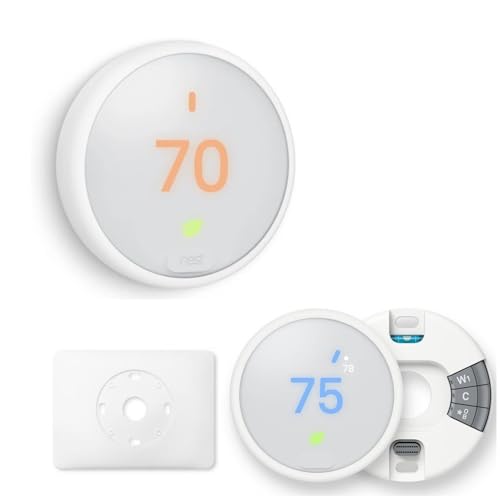
Google Nest Thermostat - Programmable Smart Learning Thermostat with Easy Installation and Trim Kit Bundle, White
Chosen because it specifies White.
View on Amazon
ecobee Smart Thermostat Essential - WiFi Thermostat, Energy Star Certified | Programmable Wi-Fi Thermostat - Works with Siri, Alexa, and Google Assistant. energy saving thermostat.
Chosen because it specifies WiFi Thermostat and Energy Star Certified.
View on AmazonWhen no C-wire is connected, some thermostats use a technique called power stealing: they draw tiny amounts of current through the heating or cooling wires while the system is idle. It works for many homes, but it can cause side effects in a few: a furnace that clicks, a blower that hums, or a thermostat that drops offline at the end of a long cooling cycle. That is why the wiring of the specific system matters more than the brand name on the box.
Step 1: Look at the wires before you shop
- Switch the system off. Turn off power to the furnace or air handler at the breaker or the service switch before you touch anything. Low-voltage wires are mild, but a shorted wire can blow the small fuse on the control board.
- Take off the faceplate. Most old thermostats pull straight off the wall plate or unscrew from it.
- Photograph the terminals. Take a clear photo of every wire and the label on the terminal it enters. Label each wire with the sticker tabs that ship with most new thermostats.
- Read the letters. R (or Rc/Rh) is power, W is heat, Y is cooling, G is the fan, and C is common. O/B is the reversing valve in a heat pump. If you see a C, you are fine. If you do not, look for a wire that is tucked back into the wall and not connected to anything.
- Count the wires. A four-wire cable is R, W, Y, G. A five-wire cable often has a spare conductor that can become the C-wire if both ends are free.
- Check the furnace board. Open the furnace panel (with power off) and look for a terminal strip marked R, W, Y, G, C. If a wire is on C at the board but not at the wall, it is only a matter of connecting it.
Step 2: Pick your route when there is no C-wire
| Route | How it works | Best when | Watch out for |
|---|---|---|---|
| Spare wire in the cable | Connect an unused conductor to C at the wall and the furnace board | You have a 5-wire or 8-wire bundle with a free conductor | Both ends must land on the right terminals; check the wire is not already used |
| Power-extender kit | A small module at the furnace converts existing wires so the thermostat gets steady power | You only have R, W, Y, G and a standard gas furnace with AC | The kit is made for specific brands; confirm it matches your thermostat |
| Built-in power stealing | The thermostat draws trickle power through the heating or cooling wires | A simple forced-air system with a robust transformer | Humming, clicking or Wi-Fi dropouts in a minority of homes |
| Battery plus stealing | AA batteries hold the thermostat steady when the wires cannot | Rentals or homes where wiring changes are not an option | Batteries need swapping once in a while; low-battery alerts are your cue |
| Add-a-wire adapter | A small converter reuses the fan wire as a common wire | You do not want to run new cable and the fan wire can be spared | You lose independent fan control unless the adapter handles it; read the instructions |
| Run new thermostat cable | A new multi-conductor cable is pulled from furnace to wall | You are open to a one-time wiring job or a hired HVAC technician | Fishing wire inside finished walls can be slow; a pro may be faster |
Step 3: Match the thermostat to your system type
Different heating systems have different wiring behavior, so a “works with most systems” claim can hide exceptions. Use the matrix below as a quick screen, then read the maker’s compatibility tool for the exact model.
| System | Typical wiring | No C-wire outlook |
|---|---|---|
| Gas furnace plus central AC | R, W, Y, G (C often missing) | Usually workable with a power-extender kit or a thermostat built for power stealing |
| Heat pump (no aux) | R, Y, G, O/B | Harder; many makers recommend a real common wire for a heat pump |
| Heat pump with aux heat | R, Y, G, O/B, W2/E | Use the maker’s heat-pump wiring guide; extender kits may be unsupported |
| Boiler with zone valves | Two-wire (R, W) per zone | Often battery-only models do better; power stealing may be unreliable |
| Electric baseboard heat | 120 or 240 volts, line voltage | Not a low-voltage smart thermostat; look for a line-voltage model |
| Millivolt fireplace or wall furnace | Two thin wires, very low power | Most Wi-Fi models are incompatible; check the listing |
Smart thermostat no C-wire: what to look for on the listing
- Explicit no-C-wire wording. Look for phrases such as “works without a C-wire” or an included power-extender kit. Vague “easy install” claims are not enough.
- A compatibility checker. Reputable makers run an online tool: enter your wire letters and system type and it tells you whether the model works.
- Listed heat-pump support. If you have a heat pump, the listing should state it and show the O/B and aux wiring.
- Battery or backup power. A model that accepts batteries gives you a fallback if power stealing is borderline.
- Voltage rating. Make sure it says 24 volt. Line-voltage heaters need a different type of control altogether.
- Return policy and support. Wiring luck varies; an easy return window is worth more than one extra feature.
Models that fit a no C-wire situation
These are products that showed up in listings for this search. They are described only at the level the listing and maker pages support. Always confirm your wiring in the maker’s compatibility tool.
Gear that helps
- Sensi Smart Thermostat ST55 · Wi-Fi · DIY install · Energy Star listed · listing says Alexa support; check the maker page for its C-wire and battery details.
- Google Nest Thermostat · programmable Wi-Fi model · designed to work on many systems that lack a common wire; confirm with the Nest compatibility tool for your wiring.
- ecobee Smart Thermostat Essential · Wi-Fi · Energy Star listed · ecobee supports a Power Extender Kit for homes without a C-wire, but according to ecobee that kit is not included in the box with the Essential and is sold separately, so confirm the bundle contents on the listing.
- Sensi Lite Smart Thermostat ST25 · Wi-Fi · DIY · Energy Star listed · a simpler option; verify its wiring requirements before ordering.
Installation walk-through
- Turn the power off, remove the old thermostat and photograph the wiring.
- Check your new thermostat’s compatibility guide against the photo.
- Install the power-extender or adapter first if you need one. At the furnace board, connect it as the instructions show; it usually involves a few wires moved to new terminals.
- Mount the new base plate, level it, and connect each wire to its matching terminal.
- Restore power and let the thermostat start up. It may take a minute or two to boot.
- Run through the setup wizard: select the system type and whether you have a heat pump, aux heat or both.
- Run each mode in turn: heat, cool, fan. Listen for odd clicking and confirm the equipment starts within a few minutes.
- Watch the thermostat for a day. If it loses Wi-Fi or reboots when the AC runs, you probably need a real common wire or the extender kit.
Troubleshooting common symptoms
| Symptom | Likely cause | What to try |
|---|---|---|
| Screen goes blank during AC cycle | Not enough stolen power while Y is active | Add a power-extender kit or connect a real common wire |
| Furnace blower hums or clicks when idle | Power-stealing current leaking through the G or W wire | Follow the maker’s manual for adding the extender; call an HVAC tech if the noise persists |
| Wi-Fi drops overnight | Radio power dips when idle | Install the common wire, update firmware, or use batteries if supported |
| Heat will not turn on | Wire on the wrong terminal or the system type set incorrectly | Compare the photo of the original wiring to the new terminals |
| Cooling runs but fan will not | G wire not connected or used as a common wire | Check whether an add-a-wire adapter took over the fan wire |
When to call a professional
Hire an HVAC technician if the wiring at the furnace does not match any diagram you can find, if you have a heat pump with multi-stage backup heat, if your control board has a blown fuse, or if the system has high-voltage components. A licensed technician can add a common wire at the board in a short visit, and that is often the most reliable fix. Always follow local codes and the owner’s manual for your equipment.
FAQ
Can I install a smart thermostat without a C-wire?
Often yes. Many systems can use a spare wire, a power-extender kit, or a model built for power stealing or batteries. The exact answer depends on your system type and the thermostat model, so use the maker’s compatibility checker.
What is the cheapest way to add a C-wire?
Using an unused conductor in your existing cable is the least expensive route. Next comes a power-extender kit or add-a-wire adapter. Running new cable is a bigger job but gives a permanent fix.
Do smart thermostats work with a heat pump and no C-wire?
Some do, but heat pumps are the most demanding case. Read the maker’s heat-pump wiring guide, because reversing valves and aux heat wires change how power is shared.
Why does my thermostat reboot when the air conditioner starts?
A power-stealing design can lose enough voltage while the AC contactor pulls in that the thermostat resets. A true common wire or an extender kit typically cures it.
Is a battery-powered smart thermostat a good idea?
It can be a sensible fallback for rentals and boiler zones. Expect to replace the batteries from time to time and heed the low-battery alerts.
Can I use a smart thermostat with electric baseboard heaters?
Only a line-voltage model will do. Standard low-voltage smart thermostats are not meant for 120 or 240 volt baseboard circuits.
Does a smart thermostat need Wi-Fi to heat and cool?
No. The schedule and basic control continue to run on the device itself. You lose app control, remote access and some voice features until Wi-Fi returns.
Which route should you choose?
If you find a spare wire in the cable, connect it as the C-wire and pick any compatible model. If you have only four wires and a gas furnace with AC, choose a thermostat that ships with or supports a power-extender kit. If you have a boiler or a rental, a battery-capable model avoids rewiring. If you have a heat pump, spend ten minutes in the maker’s compatibility tool before buying. Photograph your wiring first, because that single picture settles most of the questions in this guide.
Last updated: November 2026.
More from Amazon
Programs that pair well with the guide above. Offers and eligibility are set by Amazon and may change.
Collect the home and kitchen items you want in one registry that guests can shop from.
Create a wedding registrySet up recurring deliveries of everyday items on eligible products. Terms and savings are set by Amazon.
Explore Subscribe & SaveFree shipping on eligible items, Prime Video and more. Eligible new members can start with a free trial.
Start a Prime free trialAudiobooks and podcasts to listen to on the go. Eligible new members can start with a free trial.
Try Audible freeAs an Amazon Associate we earn from qualifying purchases.